Support · Parts: Inside Art

How can we help?

Here you will find answers to the most common questions about the app, and the quickest way to write to us.

Contact

  • Send us an email

    Tell us what is happening. Your phone model, iOS or Android version and, if you use one, your screen reader (VoiceOver or TalkBack) help us understand faster.

    support@partshub.it

    Response time: usually within 3 working days.

    For museums, press and partnerships, write to info@partshub.it. All our details are on the Contact page.


  • From the app

    In Settings you will find “Send Feedback”: rate a few things about the app from 1 to 5 and, if you like, leave us a suggestion.

    Feedback is anonymous: if you want a reply, please email us.

Frequently asked questions

Open a question to read the answer.

Using the app

How do I use Parts: Inside Art in a museum?
  1. Download the app from the App Store (opens in a new tab) on iPhone or from Google Play (opens in a new tab) on Android.
  2. Unlock the museum: scan the QR code at the entrance, hold your phone near the NFC tag or enter the code the museum gives you. Some museums have free access.
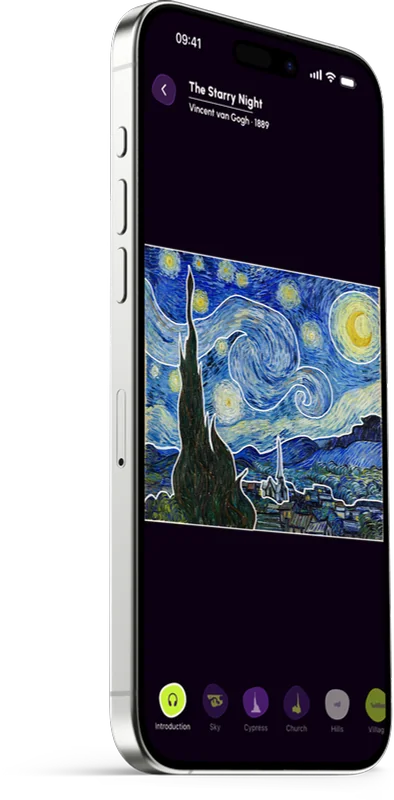
  3. Choose an artwork and drag your finger over the image: the parts light up as you pass and a vibration marks the border between one and the next. Tap a part to hear its audio description.

The first time, a short tutorial guides you step by step. You can watch it again at any time from Settings, “Try the modes”. In the galleries we recommend headphones.

What is the difference between Elements and Quadrants?

They are two ways to explore an artwork.

  • Elements: the artwork is broken down into its main elements, such as the sky, the cypress, the church. For deep, detailed knowledge.
  • Quadrants: the artwork is divided into four quadrants, to understand how it is composed in space. This is the mode we recommend for blind and partially sighted people.

You choose the mode the first time you open the app and can change it at any time from Settings, “Exploration Mode”.

Can I change the language and the audio speed?

Yes. You choose the language in Settings, “Language”. Some artworks may not be available in every language yet.

You change the speed from the player while you listen. The player also has pause and the transcript of the audio.

Does it work without a connection?

You need an internet connection to download the content the first time. With “Download artworks” you keep a museum's artworks on your phone and can listen without a network: useful in galleries with a weak signal.

When you no longer need them, you can delete the downloads.

Accessibility

Can I use the app with VoiceOver or TalkBack?

Yes. Parts: Inside Art is designed with and for blind and partially sighted people. It works with VoiceOver on iPhone and with TalkBack on Android, with the same gestures: the artwork becomes a map you explore with your finger.

  • place a finger on the artwork and move it slowly: the screen reader announces the part you are touching;
  • double-tap to hear its audio description;
  • when a description ends, the screen reader moves to the next part on its own;
  • double-tap with two fingers to pause and resume the audio.

The tutorial at the start explains these gestures step by step.

How do I report an accessibility problem?

Write to support@partshub.it. If you can, tell us your phone model, iOS or Android version, the accessibility settings you use (for example VoiceOver, TalkBack or larger text) and the screen where it happened.

You can also use “Send Feedback” in the app's Settings. The same address also works for accessibility problems on the website.

Cost, availability and data

Is the app free?

Yes. The app is free and asks for no payment.

To see a museum's artworks you need to unlock it, with the QR code, the NFC tag or the code provided by the museum; some museums have free access. Any admission ticket is the museum's own.

Which phones is it available on?

The first museum on Parts: Inside Art is the Museo Provinciale Campano in Capua.

Do I need an account?

No. The app asks for no registration, name or email. The first time you open it, it creates an anonymous technical identifier, which remembers your preferences and the museums you have unlocked.

All the details are in the app privacy policy.

How do I ask for my data to be deleted?

Write to info@partshub.it asking us to delete your data. Requests about personal data go to this address rather than to support: it is the one given in the app privacy policy, under “Data Subject Rights”.

The app does not know your name or email, so we may ask you for some information to find the data linked to your phone.

To delete the data stored on your phone straight away (downloaded artworks, audio and preferences), use Settings, “Clear all data”. Uninstalling the app stops any new data being collected.

I work in a museum: how can we bring Parts to our galleries?

Tell us about your museum: we will show you how it works and what it takes. Write to info@partshub.it or find out more on the Parts: Inside Art page.

You will find all our details on the Contact page.

Didn't find your answer?

Write to us: we usually reply within 3 working days.

Write to support@partshub.it